Running NumberOk as an operating system service
There is a possibility to run NumberOk as a service to better integrate it into distributed computation systems running on server platforms. As a service, NumberOk is better integrated to a multi-threaded environment, optimized to work with TCP/IP traffic, and also consumes less computing power.
To launch NumberOk as a service for Windows please do the following:
Install and activate NumberOk.
Set up NumberOk instance as required: connect all cameras and video sources, set required recognition zones and parameters for number plate recognition;
Close NumberOk application;
Run Start LPR service tool available at NumberOk installation folder (default location is C:\Program Files (x86)\NumberOk3\) as Administrator. Running the service under Administrator privileges is a critically important condition for its proper operation.
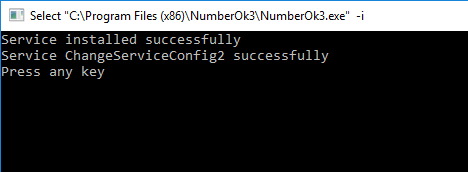
Should you try launching the program as a non-administrator user, the terminal window will prompt an error.
To fix the situation launch the Start LPR service as Administrator.
To ensure NumberOk is running as a service check the OS services list: Start > Control Panel > Administrative tools > Services or by launching Tasks Dispatcher > Services tab > Services button. Please check the line for License plate recognition service activation - this will confirm the service is installed properly.
Now NumberOk will run as a service for Windows. Having default settings (Startup type: Automatic) the service will run automatically at any OS start.
If necessary, the License plate recognition service can be stopped, launched, and restarted manually using Windows administrative tools. Dedicated utilities Stop LPR service and Start LPR service is available in the Windows Start menu in the FF folder (by default). These utilities should be launched as Administrator.
For reliable uninterrupted NumberOk to work as an OS service for a prolonged time, it is worth checking out if its properties provide a restart option under failures occurred.
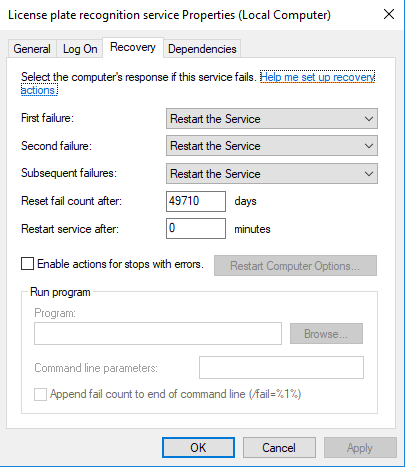
It will just restart automatically after any system failures or system restart.
It is not possible to add or remove LPs to the whitelist (and in a database in general) without stopping the NumberOK as a service.
Interfering with the operation of the database will lead to incorrect results and possible errors.
For the correct operation of the system, we recommend stopping NumberOk as a service and performing all the necessary manipulations.
To connect to the system, it is most convenient to use the second installation of the NumberOk application in the Client-server configuration or provide remote access to the computer via Teamviewer or RDP connection.