VMS integration

VMS integration

General information

NumberOk has been integrated with VMS . 

NumberOk sends to the VMS recognized license plates as Generic Events.

For sending Generic Events from NumberOk are using a standard API call in the form of an HTTP string - also known as the CreateEvent API call.


VMS integration setup

Settings > Integration > VMS
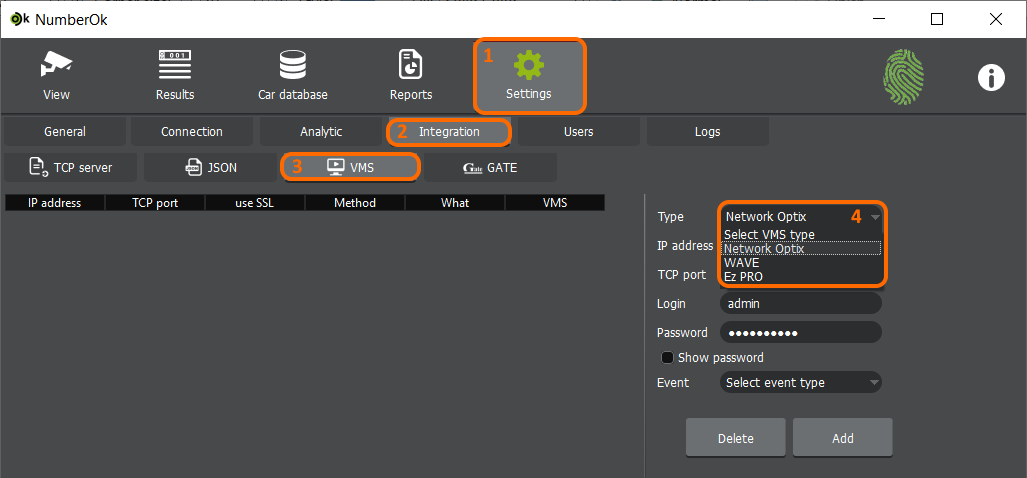


  1. in the Drop-down list, select the VMS Generic Event;

  2. input the IP address of the VMS server;

  3. input destination port (by the default 7001), 

optionally enable 'SSL'* checkbox if you want to allow secure connection only;

  1. input credentials for VMS user;

  2. choose the event type which you want to send to VMS**;

  3. press the “Add” button to apply the configuration.


*Enable the “SSL” option if you allow “Secure connection only” in your VMS. 

**Detect - first recognition after skipped plates in the analytic configuration
 Lost - last recognition result based on analytic

After pressing the ‘Add’ button, the configuration will be displayed in the table as in the picture below.


Please note that the IP address of the video camera connected to NumberOk software must match the IP address of the camera in your VMS. 

NumberOk automatically checks the correspondence of the IP addresses and based on this information, sends the metadata to the desired video channel.


Configuring Actions in the VMS

You can get detailed information on how to set up actions in VMS on Generic Events from your VMS vendor. As in the example below, you could set up to Show Text Overlay on the live image. In this case you will be able to see recognized license plates as text on the live camera image.

Also, you could “Bookmark” as action and you will find text bookmarks with recognized license plates in VMS’s video archive.

On the screenshot below you can see an example of how bookmarks look in the video archive.


Also all recognized license plates will be available in Bookmark logs.


Search by license plate text supported:



By this link, you can find the video with a demonstration of how Generic Events from NumberOk look in the VMS.


Event Snapshots

Event snapshots are not saved immediately as ANPR feature has higher priority. There are two conditions to determine the moment when an event screenshot is saved:

  1. There are 5 or more snapshots in the queue.

  2. 30 seconds have passed since the latest recognition and snapshot queue is not empty.

Path to Snapshots

%Base_Path%\YYYY.MM\DD\SID\CH0\YYYY_MM_DD_HH_MM_SS_MS_CH_ZN_SID_PLATENUM_A2_MV.EXT

where:

Base_Path

Value of ‘ScreenShots.Path’ from NumberOk.ini file

YYYY

Year, 4 digits

MM

Month, 2 digits with leading zero

DD

Day, 2 digits with leading zero

SID

System ID

CH0

Source channel number - 1, 2 digits with leading zero

HH

Hours, 2 digits with leading zero

MM

Minutes, 2 digits with leading zero

SS

Seconds, 2 digits with leading zero

MS

Milliseconds, 3 digits

CH

Source channel number - 1

ZN

Recognition zone number - 1

A2

ISO 3661 Alpha2 country code

MV

Movement, decimal code:

  MovementUndetermined   = 0x00,

 MovementTryIn          = 0x01,

 MovementIN             = 0x02,

 MovementTryOut         = 0x04,

 MovementOUT            = 0x08

EXT

File extension (JPG).


    • Related Articles

    • TCP Integration

      Preparations Set up NumberOk to recognize license plates. You will notice LP overlay accompanying vehicles under View tab when recognition is tuned up properly. TCP Integration settinga Basic settings Go to Settings > Analytic. Check Analytics: ...
    • German Special Characters Transfer via TCP/IP Integration

      Specific German characters (e.g., ü, ö) are transferred via TCP/IP in a particular format. To correctly process these characters, check two fields: RawPlateNumber and UnicodePlateNumber. License plates containing special German characters should be ...
    • FF Group Officially Joins Axis Communications

      We are excited to announce that FF Group has officially joined the Axis Communications family. This milestone marks a significant step in our growth and will enable us to accelerate innovation in AI- and data-driven solutions for intelligent traffic ...
    • Product EOL EOD updates

      Hello, As of 1 March 2026, the FF Group products listed below are no longer available for new purchases or demonstrations. This change follows the integration of FF Group into Axis Communications and the transition to the Axis license plate ...
    • LPR Cameras Connection (NumberOk META)

      1. Adding LPR camera in NumberOk Meta Navigate to Settings > Integration > LPR Cameras Click Add Camera button. Add LPR camera dialog will open. Complete the dialog with the following: Camera type - FF group protocol Describe your camera Specify ...